GENZ Stems
Drop in any song and get its parts back as separate studio tracks — vocals, drums, bass, guitar, piano and more, up to 12 stems.
Windows 10 / 11 & macOS • runs on your own computer, no upload • faster with an NVIDIA graphics card
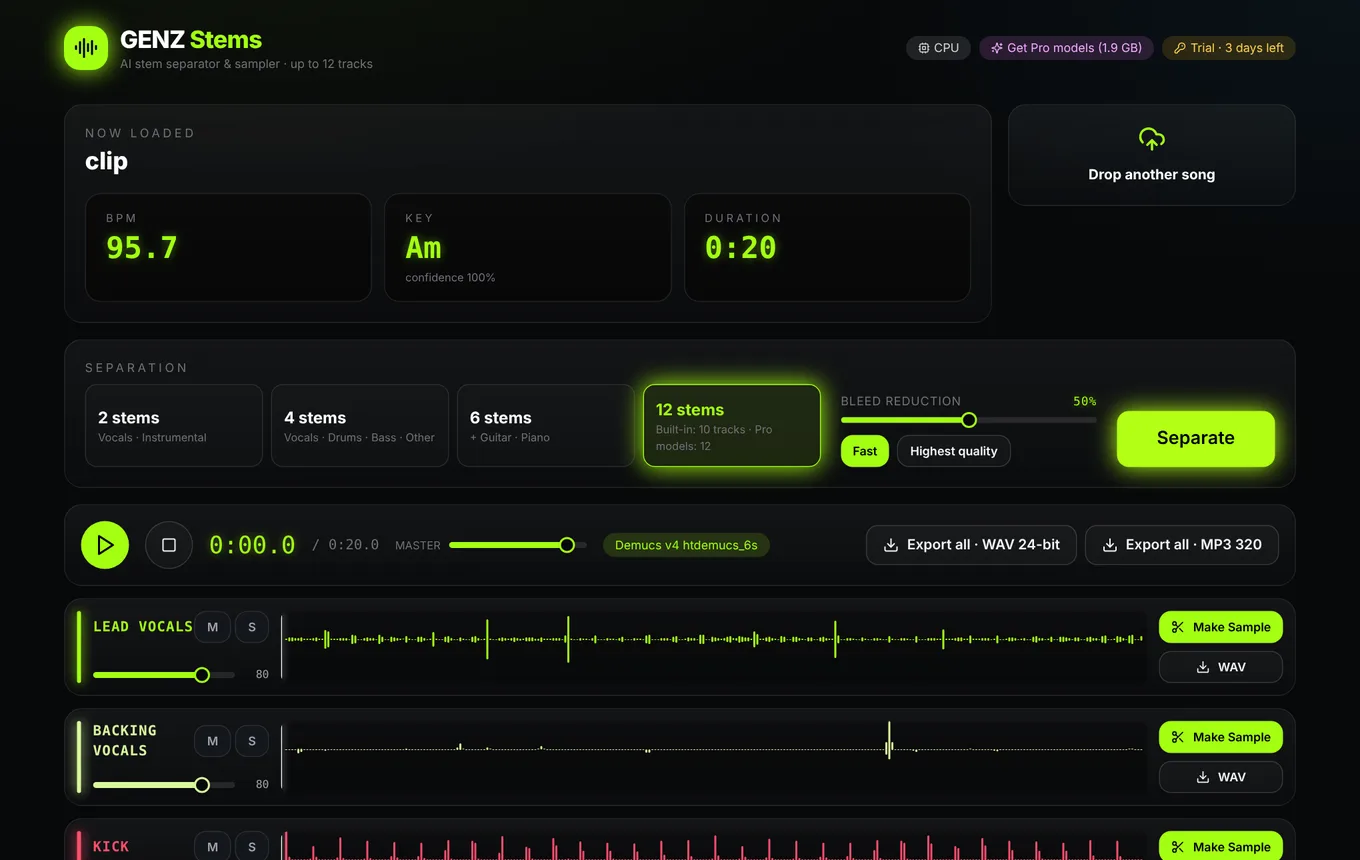
Desktop app — Windows 10 & 11 and macOS
You love the song. You only need one part of it.
A remix, a cover, a karaoke track, a drum loop to sample — they all start with the same problem: the song comes as one finished mix.
Online splitters give you 2 or 4 blurry tracks, take your song to their server and charge you every month.
GENZ Stems splits the song on your own computer into up to 12 clean tracks, and lets you turn any part into a ready sample.
Your stems in 3 steps
- 1Drop an MP3, WAV, FLAC or M4A — it reads the BPM and the key
- 2Pick 2, 4, 6 or 12 stems and press Separate
- 3Solo, mute and listen, then export every stem as WAV 24-bit or MP3 320 — or cut a loop in the Sample Lab
Everything you need from a song
Up to 12 stems
Lead vocal, backing vocals, kick, snare, toms, hi-hat, ride, crash, bass, guitar, piano and the rest.
Studio-grade AI
Modern separation models plus a bleed-removal pass, so each stem keeps its own sound and little of the others.
Private & offline
Everything runs on your computer — no uploads, no waiting in a queue, no monthly credits.
Mixer to listen
Waveform for every stem with solo, mute and volume, so you hear exactly what you are exporting.
BPM + key
Reads the tempo and the key of every song you load.
Sample Lab
Cut a loop from any stem, sync it to your BPM, change its pitch, add tape or vinyl color and save it as WAV.
WAV 24-bit / MP3 320
Export one stem or all of them in one ZIP, every file the same length as the song.
Uses your graphics card
Finds an NVIDIA card and offers its speed-up with one click; runs on any CPU without one.
Works with
One price. Yours for life.
Pay once — no subscription, no credits, no limits
- Windows desktop app
- 2 / 4 / 6 / 12 stems, unlimited songs
- Optional Pro models for the cleanest vocals and drum kit
- Sample Lab: loops synced to your BPM and key
- Free updates for v1
- License key by email, instantly (GENZ-STEMS-XXXX)
- Technical support whenever you need it
Not sure yet? Try it free for 3 days
Download the app and use everything for 3 days. After that, activate it with the key from your email.
Download the free trialQuestions
Which stems do I get?+
2 stems: vocals + music. 4: vocals, drums, bass, other. 6: adds guitar and piano. 12: lead vocal, backing vocals, kick, snare, toms, hi-hat, ride, crash, bass, guitar, piano and other.
What are the Pro models?+
A free one-time download (about 2 GB) inside the app with the strongest separation models for vocals, lead / backing vocals and the drum kit. Without them you get 10 tracks in 12-stem mode.
Is my song uploaded anywhere?+
No. Everything runs on your computer. Your songs never leave it.
How long does it take?+
With an NVIDIA graphics card, about a minute for a normal song. On a computer without one, Fast mode takes a few minutes; the Highest quality mode with the Pro models takes much longer.
Can I use the stems in my DAW?+
Yes. Every stem is a normal WAV (24-bit) or MP3 file, all the same length, so they line up when you drop them into FL Studio or any DAW.
Is it a subscription?+
No. You pay once and it’s yours for life, with free updates for v1.