GENZ Live Mixer
Use any audio interface on TikTok LIVE with studio-quality sound — auto-tune with maqamat, effects and a music player in one window.
Focusrite • Behringer • Rode • any USB interface — no OBS, no hassle
Desktop app — Windows (EXE) & macOS · does not run in the browser
Your interface sounds great. Your live doesn’t.
You bought a real mic and a real interface — then TikTok LIVE makes you sound like a phone call.
Routing it through OBS, plugins and cables takes an hour and breaks every update.
GENZ Live Mixer does it all in one window, with ~12 ms latency.
Live in 3 steps
- 1Plug in your interface, open GENZ Live Mixer and pick your mic in Audio Setup
- 2Choose a preset — or press AI Detect and it finds your maqam for the auto-tune
- 3Select CABLE Output (VB-Audio Virtual Cable) as the mic in TikTok LIVE Studio and go live — switch effects with one tap while you’re on air
Everything your live voice needs
Any audio interface
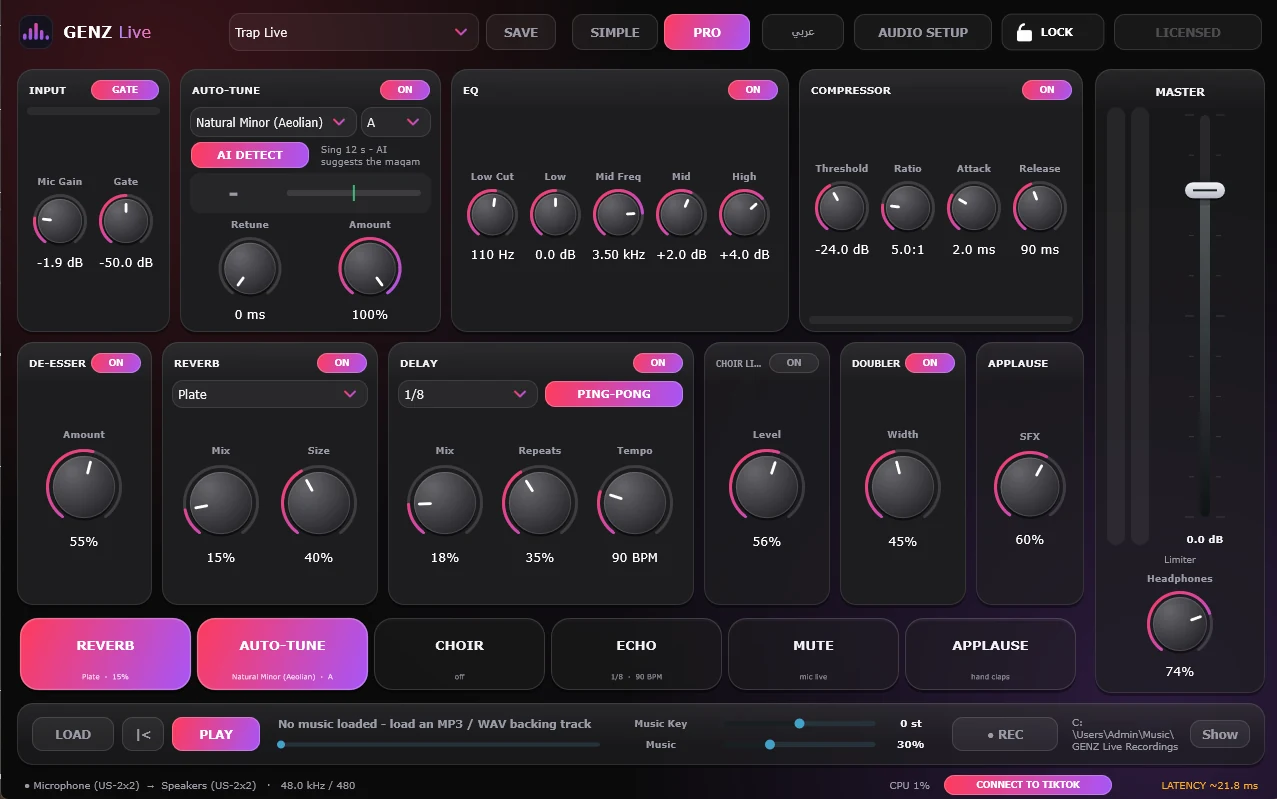
Pick your interface and mic in Audio Setup, with mic gain and a noise gate.
Maqam auto-tune + AI Detect
Bayati, Rast, Hijaz and more. Sing 12 seconds and AI Detect suggests the maqam.
Studio chain
5-band EQ, compressor, de-esser and a master limiter — tuned for live voice.
Reverb & echo
Plate / hall reverbs and a tempo-synced ping-pong delay.
Choir & doubler
Make one voice sound wide and full on the chorus.
One-tap live pads
Reverb, Auto-Tune, Choir, Echo, Mute and Applause (claps + zaghareet) — switch while on air.
Music player
Load an MP3 / WAV backing track, change its key and volume under your voice.
Record your live
One button records voice + music to your computer.
Simple / Pro · Arabic
Headphone monitoring, saved presets, a Lock button, and an Arabic interface.
Works with your gear
One price. Yours for life.
Pay once — no subscription
- Windows + macOS desktop app
- All effects, presets, the music player and recording
- Free updates for v1
- License key by email, instantly (GENZ-LIVE-XXXX)
- Technical support whenever you need it
Not sure yet? Try it free for 3 days
Download the app and go live with everything for 3 days. Recording your live is unlocked when you buy.
Download the free trialQuestions
Does it run in the browser?+
No. GENZ Live Mixer is a desktop app (EXE for Windows, app for macOS). The website is only for buying and downloading.
Do I need OBS?+
No. The app sends your processed voice (and your music) to a free virtual cable — VB-CABLE on Windows, BlackHole on Mac — and TikTok LIVE Studio uses it as the mic.
Which audio interfaces work?+
Any USB audio interface your computer already recognises — Focusrite, Behringer, Rode and more.
Can I play music while I sing?+
Yes. Load an MP3 or WAV backing track, change its key and its volume, and record your whole live.
Can I try it first?+
Yes — download it free and use everything for 3 days. Recording is unlocked when you buy.
Is it a subscription?+
No. You pay once and it’s yours for life, with free updates for v1.
Is there a phone version?+
The desktop version comes first. A mobile version is planned later.
Mac won’t open the app?+
That’s normal the first time only. Open the .dmg and drag GENZ Live Mixer to Applications. If you see “Apple could not verify…”, click Done (not Move to Trash), then go to System Settings → Privacy & Security, scroll down, click Open Anyway → Open and enter your Mac password. After that it opens normally.