
GENZ Instrumental Mix
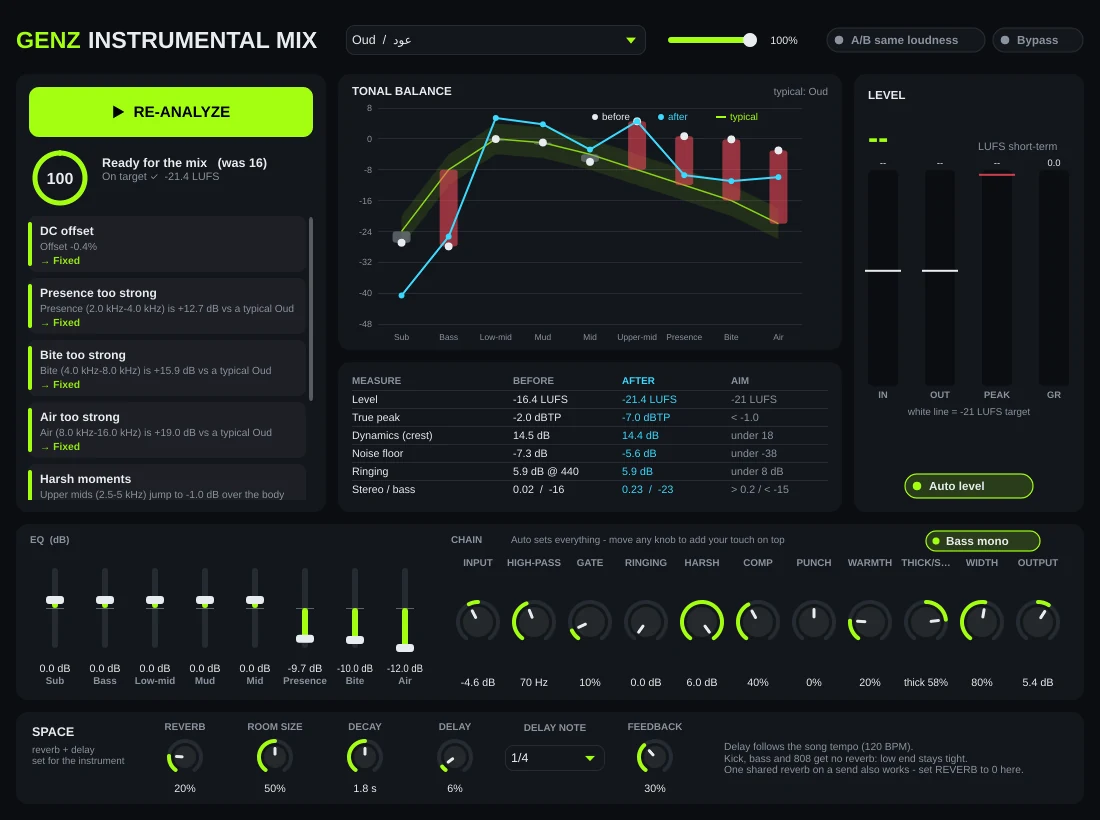
Put it on any instrument track, pick the instrument, and it analyzes the track, mixes it and fixes its problems — 40 Western, Arabic and oriental instruments.
VST3 + AU · Windows 10 / 11 & macOS • FL Studio, Ableton, Logic, Cubase, Reaper, Studio One
VST3 & AU plugin — Windows 10 & 11 and macOS
Every instrument needs its own mix. That takes hours.
An oud, a kick, a string section and a nay all need different EQ, compression and space.
Getting each track right means knowing every instrument — and a lot of trial and error.
GENZ Instrumental Mix knows the instrument you pick, listens to your track, and mixes it in one click. You can still turn any knob yourself.
A mixed track in 3 steps
- 1Put GENZ Instrumental Mix on the instrument track and pick the instrument from the list
- 2Play the part and press ANALYZE TRACK, then STOP & FIX
- 3It lists the problems, fixes them and levels the track — move any knob by hand and it stays yours
Every instrument mixed the right way
40 instruments, Western and Arabic
Drums, bass, guitars, keys, strings, brass and winds — plus oud, qanun, nay, kawala, mizmar, buzuq, santur and oriental percussion.
Analyze and fix in one click
Play the part, press Analyze: it scores the track, lists the problems in plain words and fixes them.
A full mix chain per track
High-pass, gate, ringing and harshness control, EQ, compression, punch, warmth, thickness and width.
Space that fits the instrument
Reverb and a delay locked to the song tempo, set for the instrument you picked.
Auto first, your hand on top
Any knob you move stays yours, even after a new analysis. BACK TO AUTO gives it back.
Fair before / after
Auto level keeps the track steady, and A/B compares before and after at the same loudness.
Works with
The beat makes room for the vocal
- GENZ Vocal AI — when it runs on the vocal in the same project, it tells Instrumental Mix where the voice sits and when it sings.
- VOCAL SPACE — the instruments dip a little in the vocal’s range only while it sings, so the voice comes through without turning it up.
- Stereo — only the centre is touched; the width of the instruments stays as it is.
One price. Yours for life.
Pay once — no subscription
- GENZ Instrumental Mix plugin (VST3 + AU)
- 40 Western, Arabic and oriental instrument profiles
- One-click analysis + full mix chain with reverb and tempo delay
- Free updates for v1
- License key by email, instantly (GENZ-INST-XXXX)
- Technical support whenever you need it
Not sure yet? Try it free for 3 days
Download the plugin and use everything for 3 days — only exporting your track is muted. After that, activate it with the key from your email.
Download the free trialQuestions
Where do I put it?+
On each instrument track (piano, strings, oud, drums...) — one copy per track.
Which instruments does it know?+
40 of them: drums and percussion, bass, guitars, keys and synths, orchestral strings, brass and winds, and Arabic instruments like oud, qanun, nay, kawala, mizmar, buzuq, santur, darbuka, riq and daf.
Does it decide everything for me?+
It analyzes and fixes automatically. Any knob you move by hand stays yours — even when you analyze again — and BACK TO AUTO gives it back.
Will my mix get louder or quieter?+
Auto level keeps the track at a steady level, and A/B compares before and after at the same loudness.
Is there a Mac version?+
Yes. VST3 and AU for macOS (Intel and Apple Silicon), with the same license key.
Is it a subscription?+
No. You pay once and it’s yours for life, with free updates for v1.